What you will learn
- Know what your legal notice must contain, depending on your status.
- Understand what a privacy policy must explain to your visitors.
- Work out whether your site needs a cookie banner.
- Write, complete and publish both pages with the generator.
Module 1
Understanding a website's legal duties in 5 minutes
The legal notice: who must publish what
France's law on confidence in the digital economy (LCEN, 2004) requires every website published in France to state who publishes it and who hosts it. Size doesn't matter: a five-page showcase site is covered just like an online shop.
What you must give depends on your status:
- association: name, registered office and identification number (RNA number, or entry in the court register in Alsace-Moselle);
- company: company name, legal form, share capital, registered office, RCS or SIREN number and VAT number;
- sole trader: name followed by “EI”, address, SIRET number, VAT number, or the words “TVA non applicable, article 293 B du CGI” under the small-business VAT exemption;
- in every case: a way to reach you (phone, e-mail), the publication director, and the web host (name, address, phone).
Omissions can be costly: fines of up to €75,000 for an individual and €375,000 for a legal entity (company, association). These rules apply to sites published in France; other countries have their own.
Two special cases: private persons and local law
A private person running a non-professional site (travel blog, hobby, family history) may stay anonymous. They give their name, address and phone number to their web host, and publish only the host's details. If there is a problem, the courts can obtain their identity from the host. As soon as the site serves a business activity, anonymity is no longer allowed.
Associations in Alsace-Moselle (Bas-Rhin, Haut-Rhin, Moselle) usually come under local law: they are entered in the register of associations kept by the tribunal judiciaire (the local court), instead of being declared at the prefecture like “1901 law” associations. So they have no RNA number. Their legal notice gives the court (Colmar or Strasbourg, for example) and the registration number, often written as “volume and folio”. For a local-law association, don't look for an RNA number: there isn't one.
The privacy policy: what the GDPR asks for
As soon as your site collects personal data, even through a simple contact form, the GDPR (General Data Protection Regulation) requires you to inform visitors in clear terms. The privacy policy must state:
- who is responsible for the data (the “controller”) and how to contact them;
- why the data is collected (the purposes) and on what legal basis: consent, contract, legal obligation or legitimate interest;
- how long it is kept;
- who receives it: web host, newsletter tool, payment provider;
- any transfers outside the European Union, for example to American services;
- people's rights (access, correction, erasure, objection…) and the right to complain to the CNIL, the French data protection authority.
The generator writes each section based on what your site does. Your job is to check that it matches reality.
Cookies: when do you need a banner?
A cookie is a small file stored on the visitor's device. The rule, as set out by the CNIL: cookies that are strictly necessary for the site to work (basket, login, remembering the cookie choice) are allowed freely. All others need the visitor's prior consent.
So you need a banner if you use Google Analytics, embedded YouTube videos, a Google Maps map or embedded Facebook or Instagram posts. The banner must:
- appear before any cookie is set;
- offer a “Refuse” button as visible as “Accept”;
- let visitors change their mind at any time.
Good news: properly configured audience measurement can do without one. The CNIL accepts it if the statistics stay anonymous and for your own use only, with cookies lasting 13 months at most and data kept 25 months at most. That is the case with Matomo set up according to the CNIL's recommendations, or with Plausible, which uses no cookies.
Where to publish the pages, and a template's limits
Create two pages, “Mentions légales” and “Politique de confidentialité”, and put a link to each in the footer, so they can be reached from every page of the site. A hidden or hard-to-find page doesn't meet the requirement.
Update them as soon as something changes: new chair, new web host, a newsletter or a shop added.
A template, however good, does not replace advice from a legal professional. Be especially careful if you:
- sell to consumers: you also need terms and conditions of sale, which the generator doesn't write, and a consumer mediator;
- handle sensitive data (health, opinions, religion) or a lot of data about children.
Once your pages are online, check the rest of your site (speed, display on phones, presence in Google) with the complete website diagnosis.
Key takeawayEvery site published in France must show a legal notice, plus a privacy policy as soon as it collects data. A cookie banner is only needed for cookies that are not strictly necessary.
Words to know
- LCEN
- France's 2004 law on confidence in the digital economy. Among other things, it requires a legal notice on sites published in France.
- Publication director
- The person responsible for what is published on the site: usually the chair of an association, the manager of a company or the sole trader themselves.
- Web host
- The company that stores your site on its servers and makes it available on the internet, for example OVHcloud, o2switch or Hostinger.
- GDPR
- The General Data Protection Regulation, in force throughout the European Union since 2018. It governs how personal data may be used.
- Legal basis
- The reason that allows personal data to be used: for example consent, a contract, a legal obligation or a legitimate interest.
- Cookie
- A small file stored on the visitor's device. If it isn't strictly necessary for the site to work, the visitor must agree before it is set.
- CNIL
- The Commission nationale de l'informatique et des libertés: the French authority that enforces the GDPR and handles complaints.
- Local law (Alsace-Moselle)
- Rules specific to the Bas-Rhin, Haut-Rhin and Moselle départements. Associations there are entered in the court register instead of being declared at the prefecture.
Module 2
Creating your two pages step by step
Say who publishes the site
- Open the legal notice and privacy policy generator.
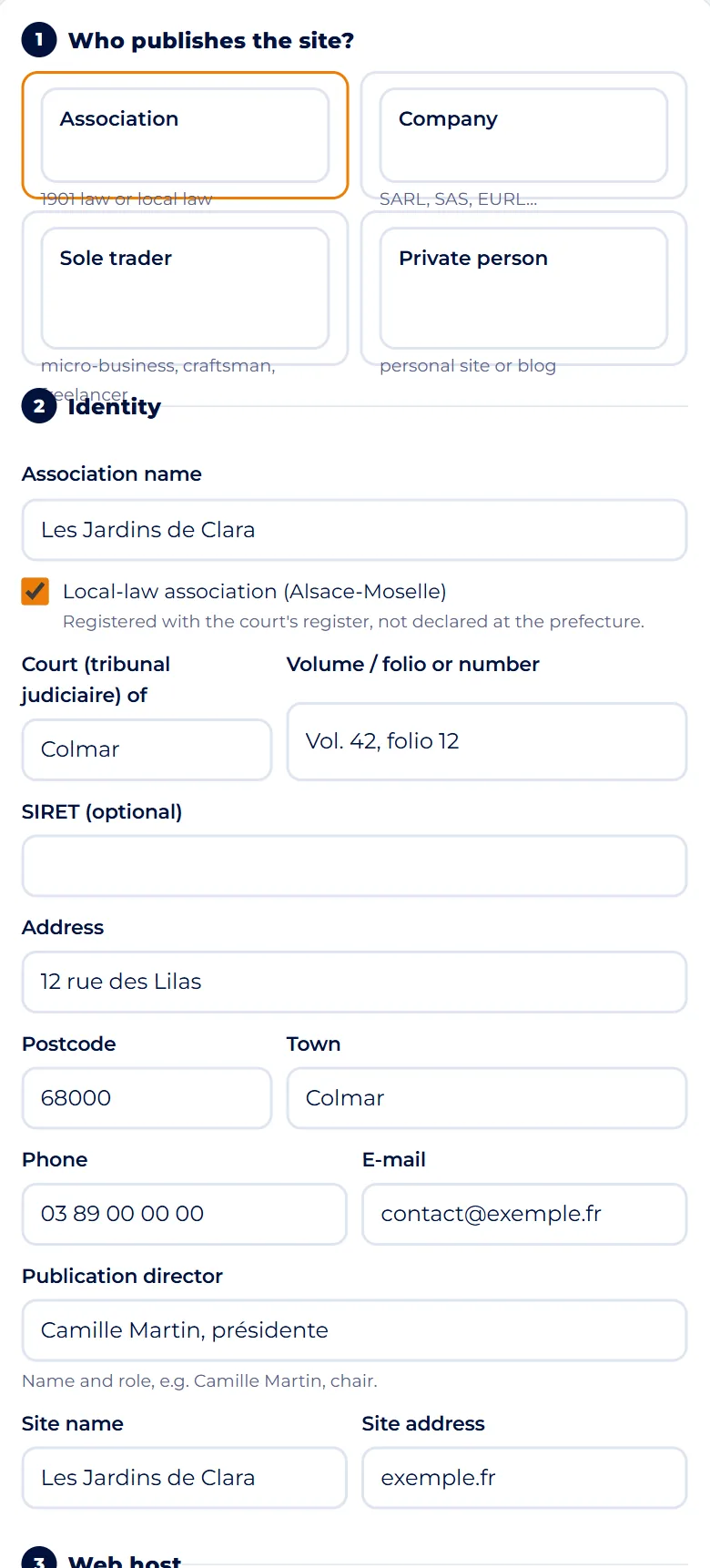
- In step 1, Who publishes the site?, choose your case: Association, Company, Sole trader or Private person.
- The form adapts to your choice and only asks the questions that matter.
- From your first answer, the preview of the documents fills in next to the form, or below it on a phone.
TipMicro-business, craftsman or freelancer without a company: choose “Sole trader”.
Fill in your identity
In step 2, Identity, enter the name, then the details that apply to your status:
- local-law association: tick Local-law association (Alsace-Moselle), then fill in Court (tribunal judiciaire) of and Volume / folio or number; otherwise, the RNA number;
- company or sole trader: SIREN or SIRET, town of the RCS register, and VAT; tick VAT not applicable (small-business exemption) if you don't charge VAT;
- private person: tick Stay anonymous if you wish.
Complete the address, phone, e-mail and Publication director (name and role), then the site name and address.
Screenshot : Legal notice and privacy TipA local-law association's registration number appears on the registration documents issued by the court.
Choose your web host
- In step 3, Web host, pick yours from the list: Hostinger, OVHcloud, o2switch, IONOS, Gandi, Infomaniak, Wix, WordPress.com or Shopify.
- Its name and address are filled in for you.
- Check them against your host's own legal notice, as companies do move.
- Then add the Host's phone number: the law requires it, and the tool doesn't fill it in.
- If your host isn't in the list, choose Other and type in its name and address yourself.
TipNot sure who hosts your site? Look at your annual invoice, or ask the person who built it.
Tick what your site does
Step 4, What the site does, is used to write the privacy policy. Tick only what really exists on your site.
- What visitors send you: contact form, newsletter, accounts, sales or donations, comments.
- What you publish about people: photos of events or of the team; for an association, the member list.
- What comes from elsewhere: YouTube videos, Google Maps, social media posts.
Two boxes open one more field: the newsletter tool and the payment provider. Also choose the Audience measurement.
Step 5, Details (optional), adds a dedicated e-mail for personal data requests, photo credits, the site designer or a consumer mediator.
TipNot sure what your web designer installed? Ask them: a forgotten Google Analytics changes the answer about the cookie banner.
Read the preview and the “To complete” list
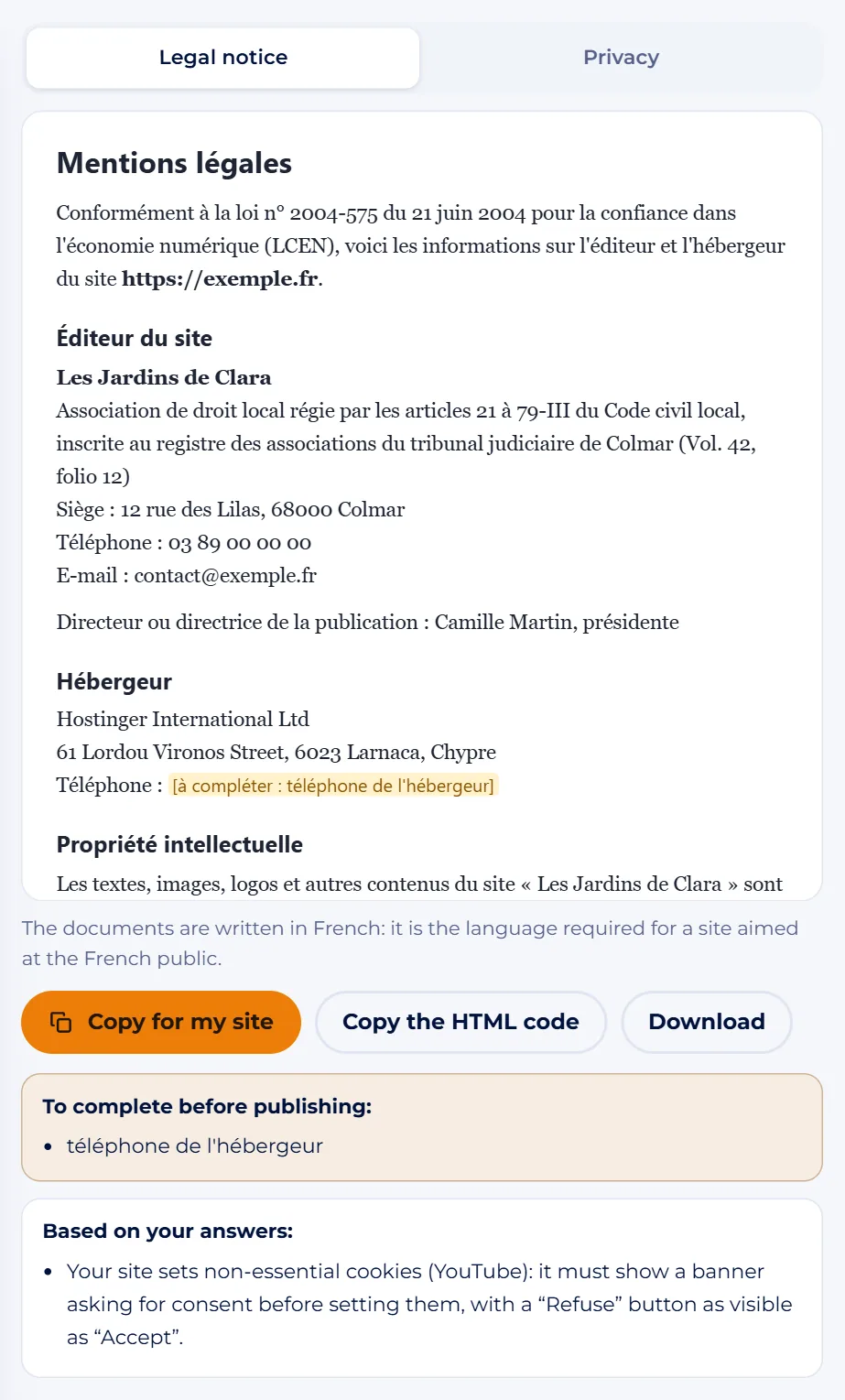
- Next to the form (below it on a phone), the preview shows both documents in two tabs: Legal notice and Privacy.
- They are written in French, the language required for a site aimed at the French public.
- Each missing item is highlighted in yellow as “[à compléter : …]” and listed in the To complete before publishing box.
- Fill them in until you see “Everything is filled in”.
- Also read the Based on your answers box: it tells you whether a cookie banner is needed and gives tailored advice (photos, member list, online sales, the “EI” mention).
Screenshot : Legal notice and privacy TipRead both documents in full: only you know whether every sentence matches your site.
Copy the texts and publish them
Open the tab you want, then choose:
- Copy for my site: to paste into a WordPress, Wix or Jimdo page, keeping headings and lists;
- Copy the HTML code: for an HTML block or a hand-built site;
- Download: to keep a copy of the document as a file.
Repeat for the second tab, create your two pages and add their links to the footer. Your answers are saved in your browser, on this device only: nothing is sent. The Clear everything link deletes them, which is handy on a shared computer.
TipIn WordPress, Settings › Privacy lets you set your new page as the site's privacy policy page.
All done: over to you.
Module 3
Practical cases
A local-law association in Colmar
Les Jardins de Clara, an association registered with the court in Colmar, is rebuilding its site exemple.fr. Camille Martin, its chair, chooses Association, ticks the local-law box and enters “Vol. 42, folio 12”, taken from the registration documents. No RNA number: that's normal.
She picks Hostinger as the web host. The “To complete” box reminds her of the host's phone number, which she finds in the host's own legal notice. Because the site embeds a YouTube video, the tool tells her a cookie banner is needed. She weighs it up: install a banner, or replace the video with a simple link to YouTube. She chooses the link, unticks the box, and the tool now says no banner is needed.
A micro-entrepreneur selling online
Léa Muller, a dressmaker in Mulhouse, sells her creations on atelier-lea.exemple.fr. She chooses Sole trader: her name appears followed by “EI”. She doesn't charge VAT and ticks VAT not applicable (small-business exemption): the document states “TVA non applicable, article 293 B du Code général des impôts”.
She ticks online sales with payment through Stripe, and a newsletter sent with Brevo. The privacy policy names both providers, and a possible transfer to the United States for Stripe. The tool reminds her that before opening her shop, she must also appoint a consumer mediator and write terms and conditions of sale.
An anonymous personal blog
Bernard writes about his hikes in the Vosges on a personal blog, with no advertising or sales. He chooses Private person and ticks Stay anonymous: the legal notice only states that the site is published by a private individual and gives his web host's details. The tool reminds him that he must still have given his name, address and phone number to that host.
He unticks Contact form, since his blog doesn't have one, and chooses no audience measurement. The privacy policy then states that the site collects no personal data, apart from the server's technical logs. No cookie banner needed.
Common mistakes
- Copying another site's legal notice: the details, the host and the services used are not yours.
- Forgetting the host's phone number: the law requires it, just like its name and address.
- Giving an RNA number for a local-law association: it is identified by the court and its registration number in the register.
- Embedding YouTube videos or using Google Analytics without a cookie banner: these services need the visitor's prior consent.
- Publishing and forgetting: a new chair, host or tool must be reflected in your pages.
The essentials
- Every site published in France shows a legal notice: who publishes it, who is responsible for it, who hosts it.
- The content depends on status: RNA number or court register for an association, RCS and capital for a company, “EI” for a sole trader.
- The privacy policy explains what data is collected, why, for how long, who receives it and how to exercise one's rights.
- A cookie banner is only needed for non-essential cookies: Google Analytics, YouTube, Google Maps, social media.
- The generator gives you a template to review, not legal advice; online sales also need terms of sale and a mediator.
Test yourself
A few questions to check that everything is clear.